Netatmo integration for Gladys Assistant
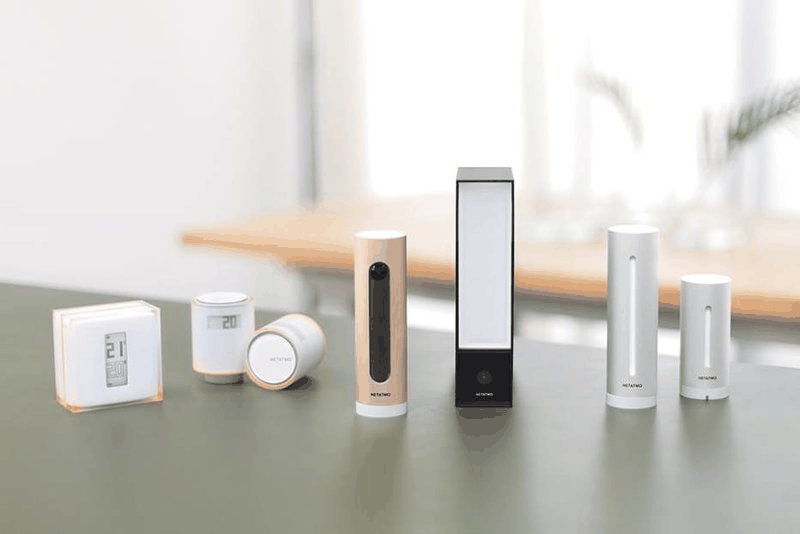
Connect your Netatmo devices (weather station, thermostats, cameras) to Gladys Assistant.
Published by Terdious
- Devices
- Version 1.2.0
- Requires Gladys >=4.83.0
- ★ 0
Connect your Netatmo devices — weather station, thermostats and radiator valves, indoor/outdoor cameras and their accessories — to Gladys Assistant.
This integration talks to the Netatmo cloud on your behalf: you create your own Netatmo Connect application once, connect your account, and Gladys discovers your devices and keeps their values up to date.
Prerequisites
- A Netatmo account, with your devices already installed and working in the Netatmo app (Gladys reads what Netatmo exposes — a device must be online in Netatmo first).
- A Gladys Assistant instance that supports external integrations.
Step 1 — Create your Netatmo Connect application
Gladys never ships a shared Netatmo key: you use your own Netatmo Connect application, so your data stays between your Gladys and your Netatmo account.
- Go to Netatmo Connect and sign in with your Netatmo account.
- Open My Apps → Create and create a new application (any name and description — e.g. "Gladys").
- Once created, the application page shows two values you will copy into
Gladys:
- client id
- client secret
You do not need to configure scopes or a redirect URI on the portal: Gladys requests the required scopes (read + write, covering Energy, Weather and Security including cameras) automatically during the connection, and handles the OAuth2 redirect itself.
Step 2 — Configure and connect in Gladys
On the integration's Configuration screen:
- Paste your client id and client secret.
- Click Save.
- Click Connect: a Netatmo window opens, sign in and authorize Gladys. You are redirected back and the status becomes Connected.
Tip: always Save the client id / secret before clicking Connect. If Connect reports that the credentials must be saved first, save the form and click Connect again.
The access and refresh tokens are stored by the integration itself and never appear on the form. Gladys refreshes them automatically; if the session ever expires beyond repair, the Configuration screen tells you to reconnect.
Step 3 — Choose the device families
Under Devices to discover, enable the families you own:
| Toggle | Discovers |
|---|---|
| Energy | Thermostat (NATherm1), relay plug (NAPlug), radiator valves (NRV) |
| Weather | Station (NAMain) + outdoor, wind, rain and extra indoor modules |
| Security | Indoor (NACamera) and outdoor (NOC) cameras, plus their accessories |
Enabling a family and saving re-runs the discovery automatically — no manual re-scan needed. Newly surfaced devices appear on the Discovery screen, where you create the ones you want.
Camera live stream quality (poor / low / medium / high, default
high) sets the quality of the camera live stream.
Values refresh every 2 minutes (Netatmo rate limits).
Cameras
When the Security family is enabled, each camera is created with:
- a dashboard image (a snapshot, refreshed automatically) — Gladys fetches it from the local network first (falling back to the Netatmo VPN URL);
- a monitoring switch (turn the camera's monitoring on/off);
- a live stream button (HLS), built local-first as well.
Live stream — latency and audio
- Latency (~10 s): this is inherent to the Netatmo live HLS stream — the
exact same delay exists on Netatmo's own web and mobile apps. Prefer the
dashboard camera box latency
low, andmediumcamera quality (720p) if you want smoother playback. - No sound? The camera microphone must be enabled in the Netatmo app: Manage my home → select the camera's room → Camera → Advanced settings → enable the Microphone. If it is off there, no client (Gladys, Netatmo web, Netatmo app) gets audio. Gladys transports the audio whenever the stream carries it — there is nothing to configure on the Gladys side.
Gladys Plus webhooks (real time) — optional
By default Gladys polls Netatmo every 2 minutes. With webhooks, Netatmo tells Gladys as soon as something happens: values are then refreshed in 2-3 seconds instead of waiting for the next cycle — without increasing the number of Netatmo API calls.
Since a local Gladys is not reachable from the Internet, Gladys Plus relays the events, so an active Gladys Plus subscription is required.
Setup (a single step)
- On the integration Configuration screen, find the "Gladys Plus webhooks" block (shown automatically).
- Paste your Gladys Plus Open API key there. That's it.
Nothing to paste on the Netatmo website: the integration registers the URL at Netatmo itself, and re-registers it on every reconnection. To check, open the integration Logs: you should see
Netatmo webhook registered — events will trigger an immediate refresh
Without a key (or without Gladys Plus), the integration behaves exactly as before, polling every 2 minutes.
What it brings
- Values land almost instantly — for example a thermostat setpoint changed from the Netatmo app, or a camera monitoring state.
- Detections you can use in your scenes (see below).
Real-time detections (scene triggers)
Some events are momentary: they exist only in the event stream, no API poll can report them. They are published as dedicated features, usable as scene triggers:
| Device | Feature | Fired by |
|---|---|---|
| Indoor and outdoor cameras | Motion | motion detected |
| Indoor and outdoor cameras | Person detected | a person detected / recognized |
| Outdoor camera (Presence) | Animal detected | an animal detected |
| Outdoor camera (Presence) | Vehicle detected | a vehicle detected |
| Smoke alarm | Smoke | a smoke detection |
Each detection goes to Yes and returns to No by itself after one minute (Netatmo sends no "detection over" event). In a scene, use the "value becomes Yes" trigger.
⚠️ If your cameras already existed in Gladys, these new features do not appear on their own: go to the Discovery screen and click Update on each camera (or smoke alarm) to add them. Without webhooks configured, these features simply stay at "No".
Security accessories (camera-bridged)
When the Security family is enabled, the accessories linked to your cameras are discovered too:
- Door / window tag (
NACamDoorTag) — an opening sensor (open/closed), plus battery and RF signal. - Indoor siren (
NIS) — a read-only sounding sensor, plus battery and RF. - Smoke alarm (
NSD) — discovered with its battery and signal, plus a Smoke feature fed by the webhooks (see the section above): polling alone cannot report that state.
Updating the integration
The "Force update" button in the Supervision tab pulls a new Docker image (the runtime). The version shown and the configuration fields come from the manifest you installed. If an update adds new configuration fields, re-install / re-paste the updated manifest to pick them up.
Migrating from the built-in Netatmo service
If you used the Netatmo service built into Gladys, this external integration
replaces it. Devices are re-discovered as new (their identifiers changed
from netatmo:* to ext:netatmo:*), so their history is not carried over —
create the devices again from the Discovery screen.
Troubleshooting
- "Save first" when connecting: save the client id / secret, then click Connect again.
- Session expired: click Connect again to re-authorize your Netatmo account.
- A device shows an "unreachable" badge: Netatmo reports it as offline (dead battery, powered off, out of range). Gladys stops publishing its last-known values so you are not misled by stale data; the badge clears when the device comes back.
- A camera value or monitoring command fails once with a "reconnect" message: your Netatmo authorization is missing the camera scope — reconnect your account.
- No camera sound: see the microphone tip in the Cameras section above.
Configuration settings
These are the settings Netatmo asks for in its configuration screen in Gladys.
| Setting | Type | Required | Description |
|---|---|---|---|
| Netatmo Connect application | section | No | Gladys talks to Netatmo through YOUR own Netatmo Connect application. Create a Netatmo account, then a developer application to obtain the client id and client secret below. The scopes (read + write) are requested automatically at connection — nothing to configure on the portal. See the step-by-step in the Documentation. |
| Netatmo application client id | string | Yes | The client id of the application created on dev.netatmo.com (Netatmo Connect). |
| Netatmo application client secret | secret | Yes | The client secret of the application created on dev.netatmo.com (Netatmo Connect). |
| Netatmo account | oauth2 | Yes | Sign in with your Netatmo account to authorize Gladys to access your devices. |
| Devices to discover | section | No | Choose which Netatmo device families Gladys should discover. Enabling a family and saving re-runs the discovery automatically — no manual re-scan needed. Security covers the cameras and their accessories (door/window tag, siren, smoke alarm). |
| Energy devices (thermostats, valves) | boolean | No | Discover the Netatmo Energy devices: thermostats, relay plugs and radiator valves. |
| Weather devices (stations and modules) | boolean | No | Discover the Netatmo Weather devices: stations, outdoor, wind, rain and indoor modules. |
| Security devices (cameras) | boolean | No | Discover the Netatmo Security devices: indoor (NACamera) and outdoor (NOC) cameras. |
| Camera live stream quality | select | No | Quality of the camera live stream (per-camera override via the camera_quality device param). |
How to install Netatmo in Gladys
- In Gladys, open Integrations: Netatmo appears in the catalog, next to the native integrations, with a community badge.
- Click Install. Gladys pulls the Docker image (
ghcr.io/terdious/gladys-netatmo:1.2.0), starts it in a sandbox isolated from the core, and generates the integration's interface (devices, discovery and configuration). - Open the Configuration screen of the integration, fill in the settings, and save.
- You can also install it directly from its repository URL: https://github.com/Terdious/gladys-netatmo.
Netatmo requires Gladys >=4.83.0. The catalog inside Gladys refreshes every hour, so a new version becomes available at most one hour after its release.
Not running Gladys yet? It is free and open source: follow the installation guide to get started.
About external integrations
Netatmo is an external integration: a community integration packaged as a Docker container and published on GitHub, that Gladys installs in one click and runs in a sandbox isolated from its core. It is published and maintained by Terdious, not by the Gladys core team.
- Browse all external integrations
- Discover the native integrations built into Gladys
- Build and publish your own external integration
- Source code on GitHub — source of this documentation